
Markdown Task List Generator
Loading converter…
Markdown Task List Syntax & Examples
- [ ] for an unfinished task and - [x] for a completed one. The generator creates these lines for you so you do not have to format each checkbox manually.Unchecked Tasks
- [ ] Write the README
- [ ] Review the installation steps
- [ ] Publish the documentation
Completed Tasks
- [x] Create the repository
- [x] Add the initial files
- [ ] Publish the first release
Nested Tasks — related tasks placed underneath a parent item by indenting them
- [ ] Prepare the next release
  - [x] Run the test suite
  - [x] Update the changelog
- [ ] Publish the releaseHow to Generate a Markdown Task List
Add your tasks
Enter individual tasks or paste several lines into the generator.
Set the status
Leave items unchecked or mark completed tasks with the checkbox control.
Organize subtasks
Indent related items when a task contains smaller steps.
Review the output
Check the generated Markdown and make any edits you need.
Copy the checklist
Copy the finished Markdown and paste it into your README, documentation, issue, notes, or project file.
Task List Types and Common Uses
Release Checklist
Prepare and publish a software release. Example tasks: Run tests, update changelog, publish release.
Feature Roadmap
Track planned and completed features. Example tasks: User login, notifications, payment support.
Documentation Checklist
Manage writing and review steps. Example tasks: Add setup guide, review examples, update API docs.
Installation Checklist
Guide users through a setup process. Example tasks: Install dependencies, configure project, run tests.
Testing Checklist
Record verification and QA steps. Example tasks: Run unit tests, check browser behavior, verify fixes.
Daily TODO List
Organize personal or developer tasks. Example tasks: Review PRs, fix issues, update notes.
Content Checklist
Track writing and publishing work. Example tasks: Draft article, edit copy, publish content.
For larger checklists, group related items under clear parent tasks rather than keeping every item at the same level.
Task Lists vs Plain Bullet Lists
| Use Case | Task List | Plain Bullet List |
|---|---|---|
| Track completed work | Yes | No |
| Show pending tasks | Yes | No |
| Mark an item as complete | [x] | Not built into the syntax |
| Show project progress | Yes | Limited |
| List general information | Possible | Yes |
| Best suited for | Checklists, TODOs, workflows | Notes, ideas, summaries |
Use task lists for actionable work and regular bullets for information that does not need a completion status.
Task List Best Practices and Common Mistakes
- [ ] Task, not -[] Task.- [x] Task for completed tasks.Review API documentation over vague labels such as Documentation.Common Syntax Mistakes
Incorrect checkbox syntax
-[] Write documentation
-[x] Run tests
Correct checkbox syntax
- [ ] Write documentation
- [x] Run tests
Nested tasks — keep child items consistently indented
- [ ] Prepare release
  - [ ] Update changelog
  - [x] Run tests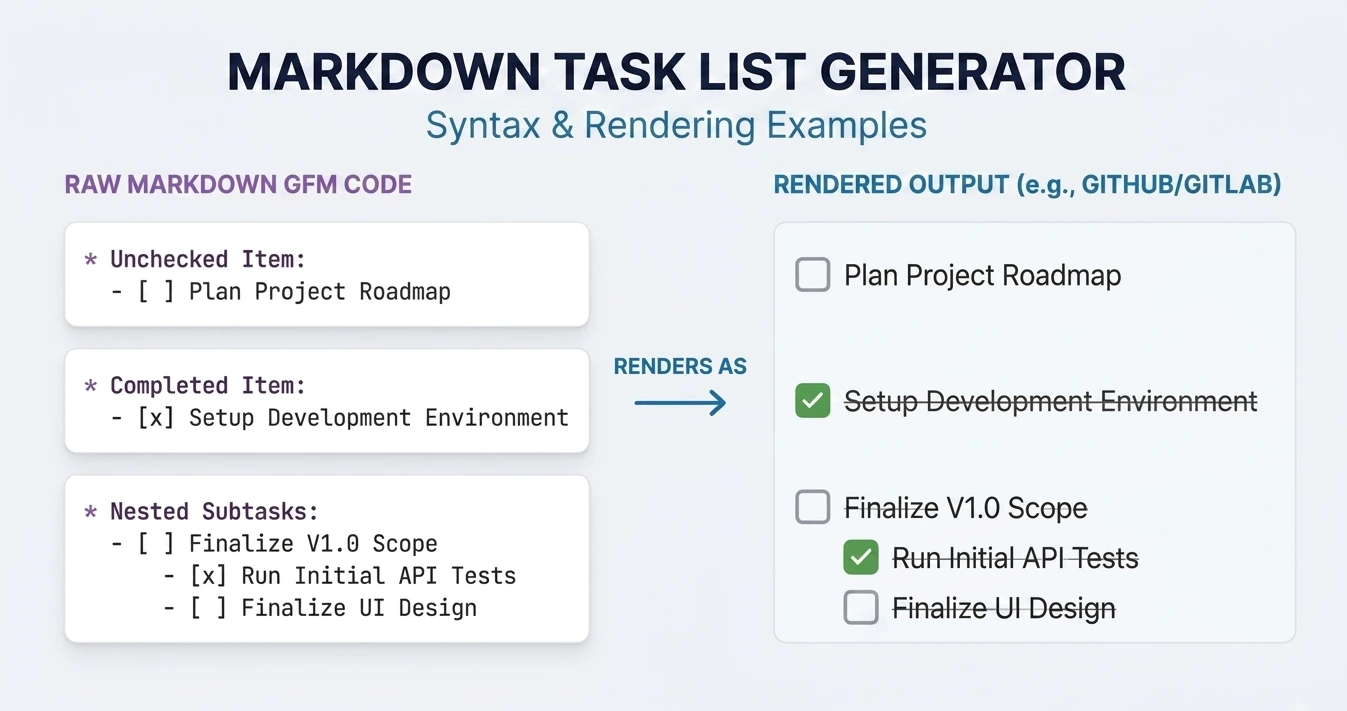
Frequently Asked Questions
- 1
What is the Markdown syntax for an unchecked task?
Use
- [ ]followed by the task name:- [ ] Write the documentation. The space between the brackets represents an incomplete task. - 2
How do I mark a Markdown task as complete?
Replace the space inside the brackets with a lowercase
x:- [x] Write the documentation. - 3
Can I create nested Markdown task lists?
Yes. Place the child task underneath its parent and use consistent indentation, for example
- [ ] Prepare releasewith- [ ] Update changelogand- [x] Run testsunderneath. The exact nesting behavior can vary between Markdown renderers. - 4
Why are my Markdown checkboxes not rendering?
Check that the platform supports task-list syntax and that your checkbox follows the expected format, such as
- [ ] Taskor- [x] Task. Also make sure the content is being rendered as Markdown rather than shown as plain text. - 5
Can I use task lists in a GitHub README?
Yes. GitHub supports task-list checkboxes in Markdown content. The interaction behavior can differ depending on where the checklist is used and the user's permissions.
- 6
Can I paste multiple tasks into the generator?
Yes. Paste multiple line-separated task names into the generator to create several checkbox items without formatting each one individually.
Related Markdown Tools
People also convert
Last updated: Category: Markdown Generators