Blog/Markdown Viewer Online

Markdown Viewer Online

Open and view Markdown (.md) files online instantly. Upload an MD file or paste Markdown text to preview headings, tables, code blocks, links, images, and lists in a clean, readable format. No installation, registration, or downloads required.

Markdown Viewer Online is a free tool that helps you open, read, and preview Markdown content directly in your browser. Whether you are working with README.md files, documentation, notes, blog drafts, or project files, this tool instantly converts raw Markdown into a clean and readable format. Everything runs locally in your browser — your Markdown stays on your device and is not stored on any server.

Loading converter…

About Markdown Viewer Online

Simply upload your Markdown file or paste Markdown text into the editor. The tool renders the content in real time, making it easier to review formatting, headings, tables, links, code snippets, and lists before publishing or sharing your work.

Use it to quickly preview README.md files, documentation, notes, and blog drafts without installing desktop software or browser extensions.

What can you preview?

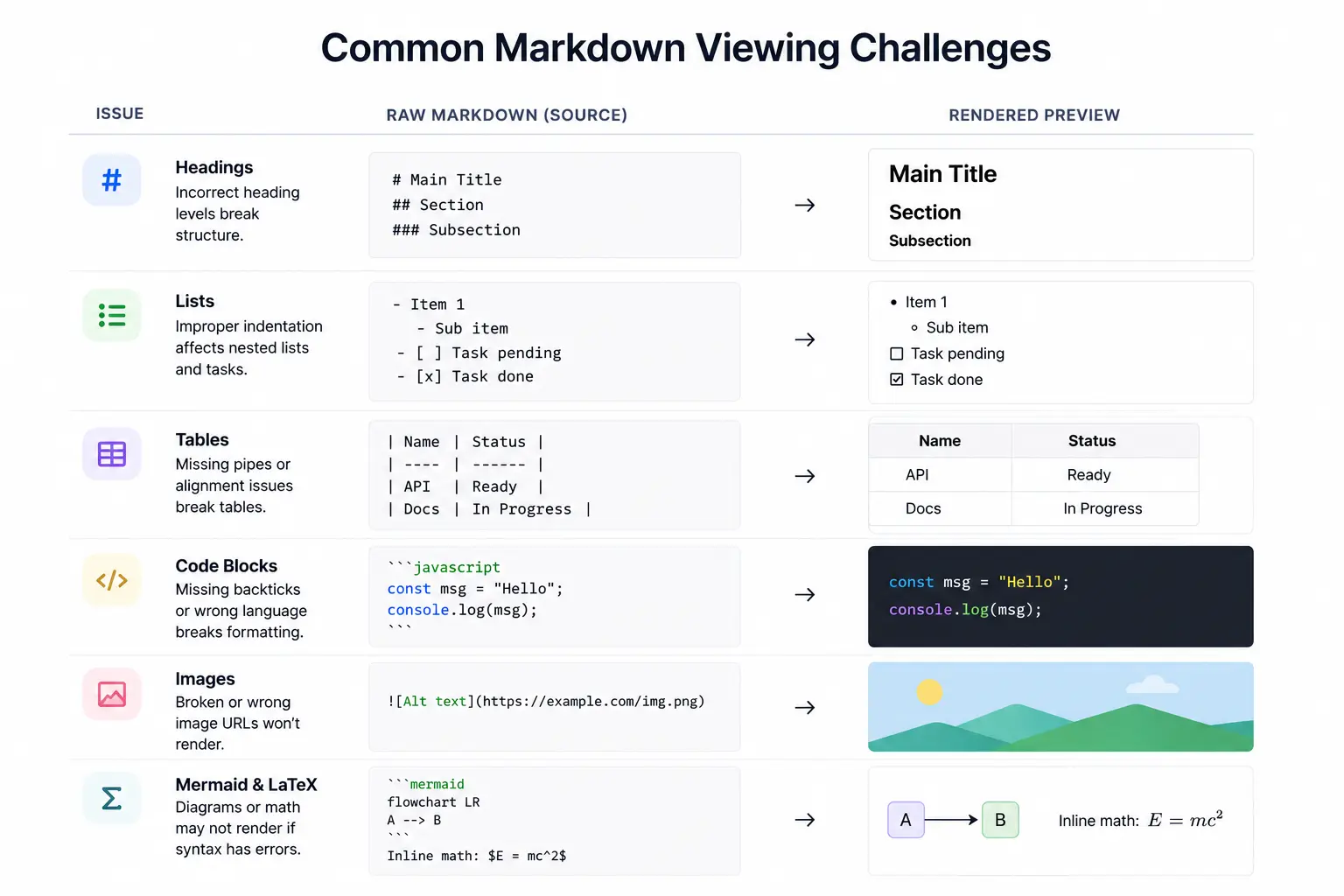
The Markdown Viewer supports most commonly used Markdown syntax including headings (H1–H6), bold and italic text, ordered and unordered lists (including nested lists), tables, hyperlinks, images, blockquotes, inline code, fenced code blocks, task lists, and horizontal rules.

Markdown Viewer vs Markdown Editor

A Markdown Viewer focuses on displaying and previewing Markdown content in a readable format. A Markdown Editor allows you to create and modify Markdown files while viewing the output.

If your goal is simply to open, read, or preview Markdown content, a Markdown Viewer is often the fastest and simplest option. When you need a full writing workspace with export options, try the Markdown Editor.

How to use Markdown Viewer Online

Upload a file or paste Markdown, then review the live preview before copying or downloading your content.

  1. Upload or paste Markdown

    Upload your .md file or paste Markdown text into the source panel.

  2. Preview renders automatically

    The tool converts your Markdown into a readable preview — no refresh required.

  3. Review formatting

    Check headings, links, tables, code blocks, images, and lists in the preview panel.

  4. Copy or download

    Copy the Markdown source or download a .md file after you finish reviewing.

Why use this Markdown Viewer?

Instant live preview

See Markdown formatting as you type or edit. Changes appear immediately without refreshing the page.

Open MD files online

Upload .md files from your device and preview them directly in your browser.

Supports common Markdown elements

View headings, tables, blockquotes, code blocks, task lists, links, images, and ordered or unordered lists.

No installation required

Use the tool from any browser on Windows, Mac, Linux, Android, or iPhone.

Private processing

Your Markdown content stays on your device and is not stored on any server.

Common uses of Markdown Viewer

Markdown Viewer Online is useful when you need to read or verify Markdown before publishing, sharing, or converting to another format.

View README.md files

Open GitHub README files or local project docs and preview how they render before pushing changes.

Review GitHub documentation

Check formatting on technical docs, wikis, and developer guides without leaving the browser.

Check blog post formatting

Preview blog drafts and newsletter content to catch heading levels, links, and table layout issues early.

Verify Markdown tables and syntax

Test pipe tables, task lists, and fenced code blocks before exporting to Word, PDF, or HTML.

Read AI-generated Markdown

Paste exported Markdown from AI tools and review structure, lists, and code blocks in a readable layout.

Prepare technical documentation

Preview internal notes, API docs, and knowledge-base articles before handoff to your team or CMS.

FAQs

Answers about opening .md files online, live preview, privacy, and when to use a viewer instead of an editor.

  1. 1

    What is a Markdown Viewer?

    A Markdown Viewer is a tool that converts raw Markdown syntax into a formatted and readable document view.

  2. 2

    Can I open .md files online?

    Yes. Upload your .md file and preview its contents directly in your browser without installing additional software.

  3. 3

    Is this Markdown Viewer free?

    Yes. The tool is completely free to use.

  4. 4

    Does it support tables and code blocks?

    Yes. Most common Markdown elements including tables, code blocks, lists, links, and headings are supported.

  5. 5

    Is my Markdown data uploaded to a server?

    No. The tool processes Markdown content locally in your browser.

  6. 6

    What is the difference between a Markdown Viewer and a Markdown Editor?

    A viewer focuses on reading and previewing Markdown in a clean layout. An editor is built for writing, editing, and exporting — use the Markdown Editor when you need a full authoring workspace.

  7. 7

    Can I copy or download my Markdown after previewing?

    Yes. Copy the Markdown source to your clipboard or download it as a .md file after reviewing the preview.