Share editable documents with clients
Deliver DOCX files stakeholders can open, edit, and comment on without Markdown tools.
Last updated: 7 min readCategory: Markdown Converters
Loading converter…
Deliver DOCX files stakeholders can open, edit, and comment on without Markdown tools.
Export Markdown notes and reports as DOCX for school or university upload portals.
Turn Markdown drafts into office-ready documents for management review and approvals.
Share guides, specs, and release notes as editable Word-compatible files.
Draft quickly in Markdown, then export a professional DOCX for presentation and review.
Use comments, suggestions, and track changes in Word, Google Docs, or LibreOffice.
Keep editable DOCX copies of important Markdown content for long-term storage.
| Format | Best use case |
|---|---|
| Markdown | Writing, version control, and lightweight editing |
| DOCX | Editing, collaboration, and formal document exchange |
Plain text format that is lightweight and simple. Popular among developers on GitHub and in documentation workflows. Ideal for version control and fast drafting.
Rich document format designed for editing and collaboration. Popular in offices and organizations. Easy to share with non-technical users in Word-compatible apps.
Convert Markdown to DOCX when your content is ready for review, submission, or collaboration outside developer tools.
Supported — H1 through H6 map to Word heading styles.
Supported — body text exports as editable paragraphs.
Supported — emphasis is preserved in the DOCX output.
Supported — hyperlinks remain clickable in compatible editors.
Supported — bullet and numbered lists export cleanly.
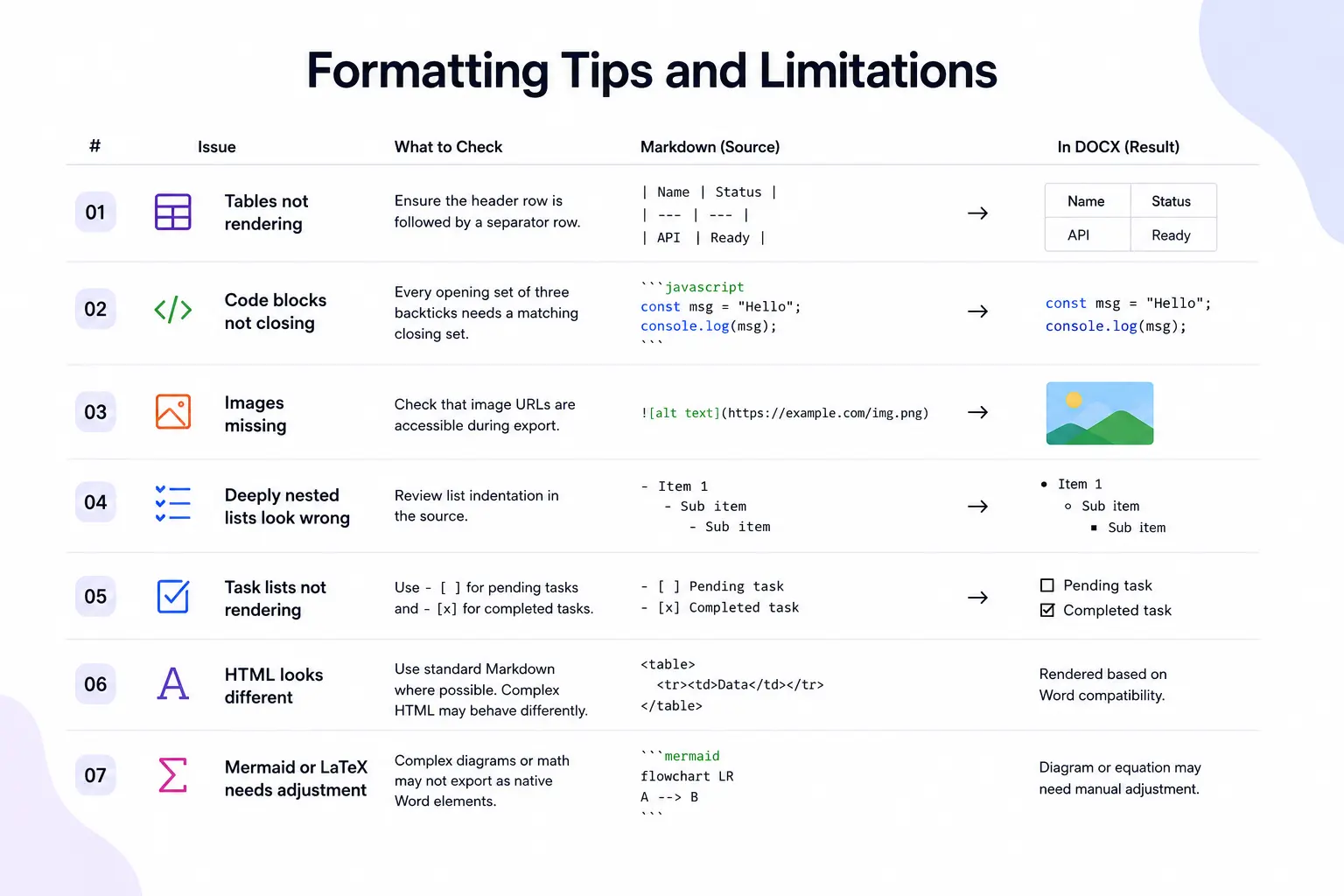
Supported — standard Markdown pipe tables convert to Word tables.
Supported — quoted sections are preserved.
Supported when image URLs load successfully during export.
Supported — fenced code exports as readable monospace text.
Supported — separators are included where applicable.
Partial support — checklist syntax may simplify in DOCX.
Limited support — diagram rendering depends on export capabilities.
Depends on rendering — some math may need manual cleanup in Word.
Developers often write guides, release notes, and project documentation in Markdown before exporting them to DOCX for stakeholders.
Teams can draft reports quickly in Markdown and then generate DOCX files for management review.
Students frequently prepare coursework in Markdown and export it as DOCX for submission requirements.
Agencies and freelancers may write content in Markdown while delivering editable DOCX files to clients.
Organizations often convert Markdown documentation into DOCX for wider distribution among non-technical teams.
Markdown offers fast drafting while DOCX provides a professional format for presentation and review.
Large tables may need formatting adjustments after export in Word or Google Docs.
Markdown does not contain advanced document styling information such as corporate templates.
Embedded widgets and dynamic elements are not supported in DOCX documents.
Diagram rendering depends on implementation and export capabilities.
Some mathematical expressions may require additional processing depending on the output format.
Paste Markdown into the editor or upload an MD file from your device.
Check headings, tables, lists, links, images, and formatting before export.
Convert Markdown into an editable DOCX document.
Download the generated DOCX file and open it in your preferred office application.
Generate DOCX files that can be edited after export.
No software installation required.
Review formatting before downloading.
Your content stays on your device.
Compatible with Microsoft Word, Google Docs, LibreOffice, and WPS Office.
Ideal for documentation, reports, proposals, assignments, and collaboration.
Convert Markdown to DOCX without registration.
Yes. You can convert Markdown files into DOCX documents without paying any fees.
DOCX is the file format used by modern versions of Microsoft Word. In most cases, the terms are used interchangeably on MDConvertHub.
They mean the same thing — converting a Markdown or MD file into a .docx document. This page targets both phrasings.
Yes. The exported file is compatible with Microsoft Word.
Yes. Google Docs can open and edit DOCX files.
Yes. DOCX files remain editable after download.
Yes. Standard Markdown tables are supported.
Yes. Supported images can be included in the exported document when they load during conversion.
Yes. Code blocks are preserved where supported.
No. Conversion takes place locally in your browser.
Yes. Use DOCX to Markdown when you need to return to Markdown format.
You can upload Markdown files with .md and .markdown extensions (up to 10 MB) or paste directly into the editor.
Neither is better. DOCX is better for editing, while PDF is better for sharing and printing.
MDConvertHub exports modern Office Open XML DOCX files. We do not generate legacy binary .doc files.
Looking for step-by-step tutorials? Explore practical guides covering Markdown workflows, document conversion, formatting tips, and productivity.