Markdown Badge Generator

Create GitHub README badges in seconds with live preview. Generate Shields.io-compatible Markdown badges for licenses, versions, build status, coverage, documentation, downloads, and custom labels without writing badge URLs manually.
Customize colors, styles, links, and alt text, then copy ready-to-use Markdown for GitHub, GitLab, documentation sites, and other Markdown platforms.
  • Free
  • Browser-based
  • No signup
  • Private

Loading converter…

What Are Markdown Badges?

Markdown badges are small visual labels displayed in Markdown documents to highlight important project information at a glance. They're most commonly placed near the top of GitHub README files, where they quickly show details such as the project license, latest version, build status, documentation, downloads, or test coverage.
Most badges are generated using Shields.io and embedded with standard Markdown image syntax. They work in GitHub, GitLab, many documentation platforms, and Markdown editors that support images.
Instead of manually building badge URLs and Markdown syntax, a Markdown Badge Generator creates ready-to-use badges instantly. This saves time, reduces formatting mistakes, and helps keep your README clean and professional.

How Markdown Badges Work

A Markdown badge is simply an image generated from a badge service such as Shields.io and embedded using Markdown image syntax. The badge displays a label, a value, and a color that communicates information about your project.
For example, a badge can show project license, current version, build status, documentation availability, test coverage, download count, release status, or custom project status.
Badges can also be wrapped inside Markdown links, allowing users to click them and open documentation, release notes, repositories, or any other webpage directly from your README.

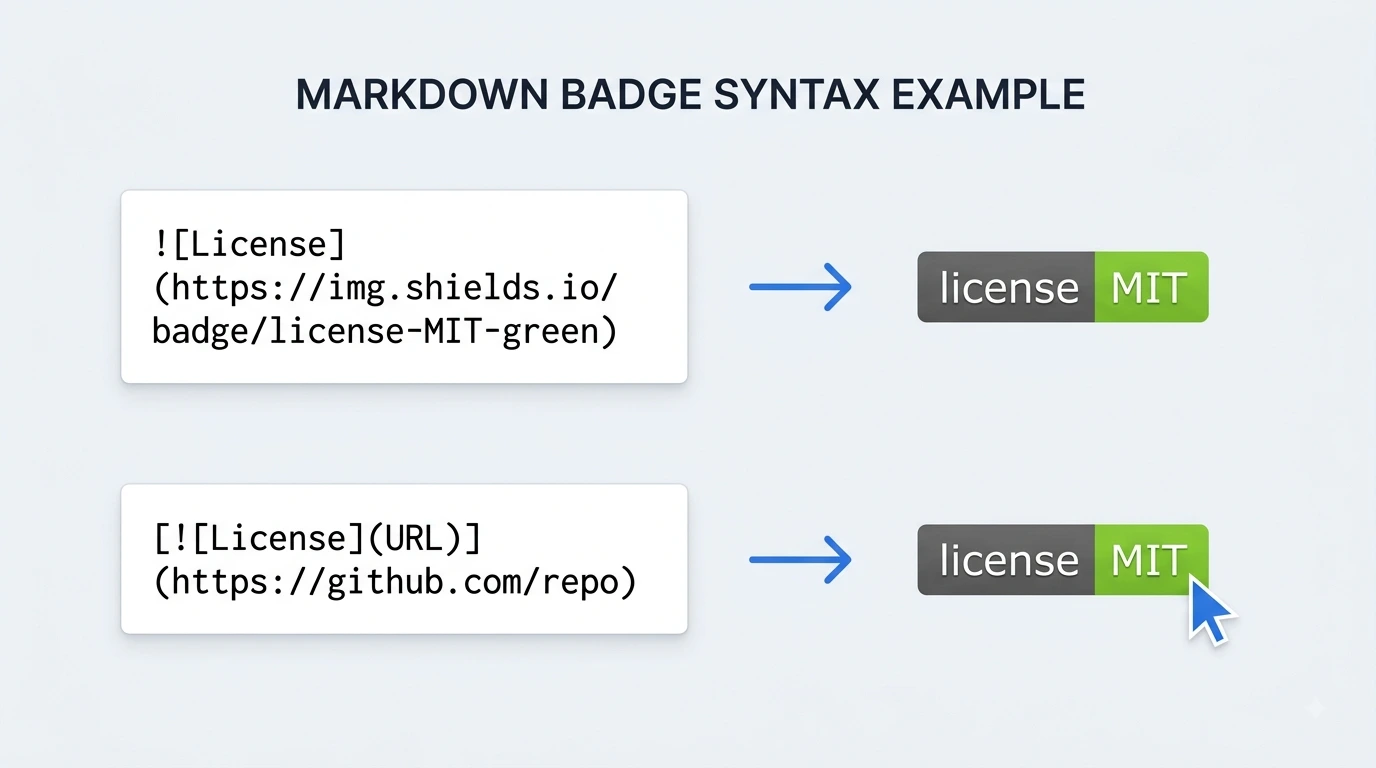
Markdown Badge Syntax

Markdown badges use the standard Markdown image format.
Basic badge: ![License](https://img.shields.io/badge/license-MIT-green)
Clickable badge: [![License](https://img.shields.io/badge/license-MIT-green)](https://github.com/your-repository)
The generator creates this Markdown automatically, so you don't need to remember the correct Shields.io URL format or Markdown syntax. Simply customize your badge, review the generated output, and copy the Markdown into your README or documentation.

GitHub README Badge Examples

GitHub README badges make repositories easier to scan by highlighting important project details before visitors start reading the documentation. Most open-source projects display a row of badges below the project title to show information such as the license, latest version, build status, documentation, or test coverage.
Here are some of the most commonly used Markdown badges.
License — Show the project's open-source license (MIT, Apache 2.0, GPL, etc.)
Version — Display the latest software or package version
Build Status — Indicate whether the latest build passed or failed
Documentation — Link visitors to project documentation
Coverage — Show automated test coverage percentage
Downloads — Display package or release download counts
Release — Highlight the latest project release
Status — Show custom project status such as Active, Beta, or Stable
These badges can be combined to create a professional README that helps users understand your project at a glance.

What Makes a Good README Badge?

Badges should make a README easier to understand, not harder to scan. A clean badge row highlights the most important project information while keeping the repository professional and easy to navigate.
Show only useful information — Include badges that provide real value, such as the project license, latest version, build status, documentation, or test coverage. Avoid adding badges that don't help readers understand the project.
Keep badge styles consistent — Using the same badge style and a consistent color palette gives your README a cleaner and more professional appearance.
Make important badges clickable — Link documentation, release notes, project websites, or package pages so visitors can access important resources directly from the badge.
Don't overload the first section — Too many badges can distract readers. In most repositories, 4–8 well-chosen badges are easier to scan than a long row of dozens of badges.
Keep badges up to date — Outdated version numbers, broken documentation links, or incorrect build status badges reduce trust. Review badges whenever you release a new version or update your project.
Prioritize readability — Place badges directly below the project title, use clear labels, and make sure they remain easy to read on both desktop and mobile devices.

Why Use This Markdown Badge Generator?

Creating one badge manually is simple, but building multiple Shields.io badge URLs with the correct formatting quickly becomes repetitive. This Markdown Badge Generator lets you customize badges visually and generates ready-to-use Markdown instantly.

Generate badges faster

Create GitHub-ready Markdown badges without remembering Shields.io URL syntax or Markdown image formatting.

Customize every badge

Choose the badge type, label, message, color, style, optional link, and alt text to match your project's branding.

Instant output while editing

The generated Markdown updates automatically as you change settings, so you can review the badge URL and syntax before copying.

Create clickable badges

Link badges to documentation, repositories, release pages, package managers, or any external resource with a single field.

Works across Markdown platforms

Generated badges work with GitHub, GitLab, Bitbucket, documentation websites, static site generators, and most Markdown editors.

Browser-based and private

Everything runs locally in your browser. Your badge settings are never uploaded, stored, or shared.

Free with no signup

Generate and copy unlimited Markdown badges without creating an account or installing any software.

Markdown Badge Generator vs Creating Badge URLs Manually

You can create GitHub README badges manually using Shields.io URLs, but even a small mistake in the label, color, style, or Markdown syntax can produce incorrect results. A Markdown Badge Generator removes that complexity by creating the badge code automatically.
FormatBest use case
Manual Shields.io URLsCreating one or two badges when you already know the URL format
Markdown Badge GeneratorREADME files, documentation, open-source projects, and repositories with multiple badges

Manual Shields.io URLs

Requires manually building Shields.io URLs. Easy to make formatting mistakes. No instant output while editing. Slower when creating multiple badges. You need to remember Markdown image syntax.

Markdown Badge Generator

Generates Markdown automatically. Output updates as you edit settings. Supports multiple badge types. Customize colors, styles, labels, and links easily. Copy ready-to-use Markdown in one click.

For occasional badges, creating URLs manually may be enough. If you regularly maintain GitHub repositories or documentation, using a Markdown Badge Generator is faster, more consistent, and less error-prone.

Popular Markdown Badge Types

Different projects use different badges depending on the information they want to highlight. This generator supports the badge types developers use most frequently in GitHub repositories, documentation, and open-source projects.
  • License badges

    Show the license your project uses, such as MIT, Apache 2.0, GPL 3.0, BSD, or ISC. A license badge immediately tells contributors how your code can be used.

  • Version badges

    Display the current version of your application, library, package, or API so users know they're viewing the latest release.

  • Build status badges

    Show whether your latest build or continuous integration workflow passed successfully. These badges help visitors quickly assess project health.

  • Documentation badges

    Link directly to user guides, API references, or developer documentation, making important resources easier to find.

  • Coverage badges

    Display automated test coverage percentages to give contributors confidence in your project's testing quality.

  • Download badges

    Highlight package downloads or release download counts for libraries, plugins, desktop applications, and other distributed software.

  • Custom badges

    Create your own badges with custom labels, messages, colors, styles, optional links, and alt text to match your project's branding or workflow.

Where Markdown Badges Are Used

Markdown badges are commonly used anywhere Markdown is supported, especially when you want to highlight important project information without adding extra text. They help readers understand the status of a project immediately and make documentation look more professional.

GitHub repositories

Display license, version, build status, documentation, and release badges below the repository title so visitors can quickly understand your project.

GitHub profile READMEs

Highlight your skills, featured projects, technologies, certifications, or achievements with custom badges that make your profile more engaging.

Open-source projects

Show build status, test coverage, package versions, downloads, and documentation links to help contributors evaluate the project before getting started.

Technical documentation

Add badges that link to documentation, API references, release notes, or support resources for easier navigation.

Libraries and packages

Display package versions, download counts, compatibility information, and license details for npm, Composer, NuGet, PyPI, and other package repositories.

Developer portfolios

Use custom badges to showcase programming languages, frameworks, tools, certifications, or project status in portfolio repositories.

Internal documentation

Use badges such as Draft, Review, Approved, or Archived to clearly indicate the current status of internal documentation.

Best Practices for Markdown Badges

Place badges below the project title

Most GitHub repositories display badges immediately below the project name. This makes important project information visible before visitors start reading the documentation.

Choose badges that matter

Include badges that provide useful information, such as the license, latest version, build status, documentation, or test coverage. Avoid adding badges that don't help readers understand the project.

Keep colors and styles consistent

Using the same badge style and a consistent color scheme creates a cleaner, more professional-looking README.

Make badges clickable

When appropriate, link badges to documentation, release notes, package pages, or your project website so visitors can quickly access additional information.

Review badges regularly

Update version numbers, documentation links, and project status badges whenever your project changes to avoid showing outdated information.

How to Generate a Markdown Badge

  1. Choose a badge type

    Select the type of badge you want to create, such as License, Version, Build, Coverage, Documentation, Downloads, or Custom.

  2. Customize the badge

    Enter the label and message, choose a color and style, then optionally add alt text or a destination URL to make the badge clickable.

  3. Review the generated output

    The Markdown output updates automatically as you edit. Review the generated syntax and Shields.io URL before copying.

  4. Copy the Markdown

    Copy the generated Markdown and paste it into your GitHub README, documentation, wiki, or any Markdown document.

Why Use README Badges?

Improve first impressions

A clean row of badges immediately tells visitors important information about your project before they start reading the documentation.

Highlight project status

Show details such as the current version, license, build status, documentation, or test coverage without adding extra paragraphs.

Follow GitHub best practices

Many successful open-source projects use badges to make repositories easier to understand and navigate.

Save time

Generate correctly formatted Markdown badges without manually building Shields.io URLs or remembering Markdown syntax.

Private and browser-based

Everything runs locally in your browser, so your badge settings remain private and are never uploaded to a server.

Common Markdown Badge Mistakes

Even small formatting mistakes can make badges confusing or less useful. Before publishing your README, review these common issues.
Adding too many badges that distract from the project description.
Using inconsistent badge colors or styles.
Leaving outdated version or build status badges in the README.
Forgetting to add links to documentation or releases.
Using unclear badge labels that don't explain their purpose.
Copying incorrect Shields.io URLs or Markdown syntax.

Frequently Asked Questions

  1. 1

    What is a Markdown badge?

    A Markdown badge is a small image-based label displayed in a Markdown document to highlight information such as the project license, version, build status, documentation, or test coverage. Badges are commonly placed at the top of GitHub README files to help visitors quickly understand a project's status.

  2. 2

    Do GitHub README badges work on GitHub?

    Yes. GitHub fully supports Markdown badges created with standard Markdown image syntax. Badges generated with services like Shields.io display correctly in README files, project documentation, and GitHub profile READMEs.

  3. 3

    Can I create custom Markdown badges?

    Yes. You can create custom badges by choosing your own label, message, color, style, and optional link. Custom badges are useful for displaying project status, technologies, releases, or any information specific to your repository.

  4. 4

    Can I make a badge clickable?

    Yes. You can wrap a badge inside a Markdown link so visitors can click it to open documentation, release notes, project websites, package pages, or any other URL.

  5. 5

    Do these badges work outside GitHub?

    Yes. Standard Markdown badges work in GitLab, Bitbucket, many documentation websites, static site generators, and most Markdown editors that support Markdown images.

  6. 6

    Is this Markdown Badge Generator free?

    Yes. You can generate, preview, and copy unlimited Markdown badges for free. Everything runs locally in your browser, so your badge settings are not uploaded or stored.

After creating your badges, these tools can help you build, edit, and improve your Markdown documentation.

People also convert

Last updated: Category: Markdown Generators