Blog/Markdown → Email

Markdown to Email Converter — Convert Markdown to clean Email-Ready HTML

Convert Markdown to email HTML online. Paste the Markdown or upload the md file to create email-ready content for Gmail, Outlook, Apple Mail, Mailchimp, Brevo, SendGrid, and other email platforms. Preview your formatting live, then copy rich HTML, inline-styled email content, or plain text without rebuilding your emails manually.

Everything runs locally in your browser. Your drafts are not uploaded to our servers.

Loading converter…

Convert Markdown to Email Without Losing Formatting

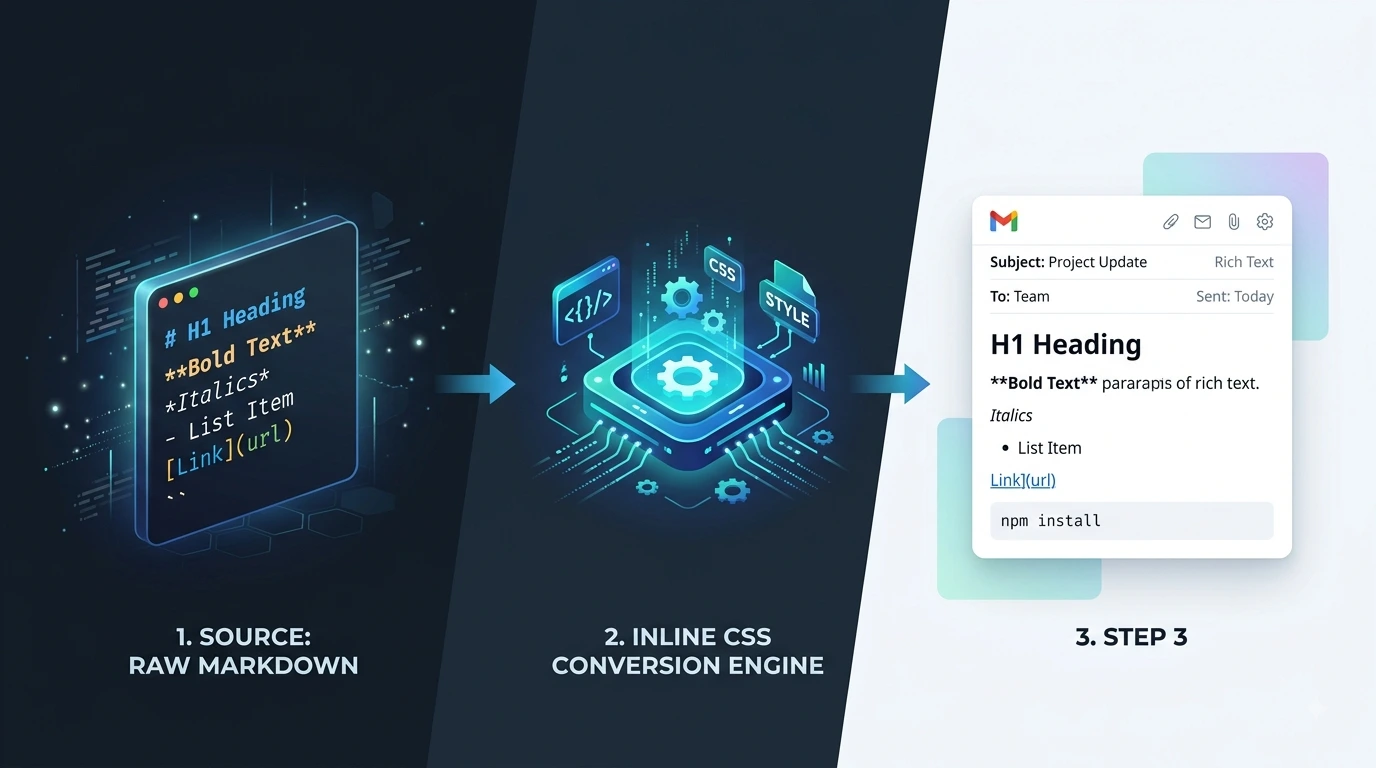
Writing emails in Markdown is fast and clean, but most email clients cannot properly display raw Markdown syntax like hash symbols for headings, asterisks for bold text, pipe tables, or list markers. This Markdown to Email Converter transforms your md content into email-safe HTML with inline CSS styles that work better across inbox clients.

Instead of manually fixing spacing, formatting, and links inside Gmail or Outlook, you can convert Markdown to email HTML instantly, copy formatted content directly into email apps, export inline-styled HTML for email builders, generate clean plain-text versions for simple email clients, and preview how headings, tables, and lists will appear before sending.

Whether you are a marketer, startup founder, developer, customer support agent, or content creator, this tool helps you write once in Markdown and send beautifully formatted emails anywhere.

What Is a Markdown to Email Converter?

A Markdown to Email Converter changes Markdown syntax into HTML designed for email clients. Markdown is popular because it is simple and distraction-free, but email platforms require HTML formatting to display headings, bold and italic text, lists, links, tables, blockquotes, code blocks, and images.

This tool converts Markdown into email-compatible HTML with inline styles, improving compatibility across Gmail, Outlook, Apple Mail, Yahoo Mail, Mailchimp, Brevo, SendGrid, CRM email editors, and help desk systems. Unlike general Markdown-to-HTML tools, this converter focuses on email rendering and copy-paste workflows.

Markdown to Email vs Markdown to HTML

Markdown to HTML tools generate general-purpose HTML for websites and CMS platforms. Markdown to Email tools optimize HTML specifically for email inbox rendering, inline CSS styling, copy-paste workflows, and better Gmail and Outlook compatibility.

If you need website HTML, use the Markdown to HTML converter instead.

Markdown to Email vs Markdown to Rich Text

Both tools support formatted paste workflows, but they serve different purposes. Markdown to Email is best for Gmail, Outlook, and email builders that expect HTML with inline styles. Markdown to Rich Text is best for Word, Google Docs, and Notion.

Email conversion focuses on HTML email compatibility and inline styles. For general document paste, see Markdown to Rich Text.

Supported Markdown Formatting

This Markdown Email Converter supports headings, bold and italic text, ordered and unordered lists, links, tables, images, blockquotes, code blocks, and horizontal rules.

Some advanced layouts may require small adjustments depending on the email client. To clean AI-generated Markdown before sending, see How to Clean AI-Generated Markdown on our blog.

How to Convert Markdown to Email

Paste or upload Markdown, preview email formatting, then copy or export for your inbox or email builder.

  1. Paste or upload Markdown

    Paste your Markdown draft or upload an .md or .markdown file — newsletters, product updates, and support templates all work.

  2. Preview email formatting

    Review spacing, links, headings, lists, tables, and code blocks in the preview panel. Edit the Markdown on the left if anything looks off.

  3. Copy or export

    Choose Copy for email, Copy HTML, Copy plain text, or Download HTML — then paste into Gmail, Outlook, Mailchimp, Brevo, SendGrid, or your preferred email builder.

Why Use This Markdown to Email Tool?

Email-friendly inline CSS

Exported HTML includes inline styles that improve formatting consistency across inbox clients.

Write faster in Markdown

Draft newsletters, product updates, and announcements quickly without fighting email editors.

Live preview before sending

See how headings, tables, lists, and links will look before you paste into Gmail or Outlook.

Copy HTML or rich email content

Use Copy for email, Copy HTML, Copy plain text, or Download HTML depending on your workflow.

Private local processing

Your content never uploads to a server. Everything happens directly in your browser.

Best Use Cases for Markdown to Email

Write once in Markdown, then send formatted email anywhere your team or customers read messages.

Product launch emails

Convert release notes and changelogs into professional customer emails with headings and lists intact.

Newsletters

Write newsletters in Markdown and paste them into Mailchimp or Brevo with formatting preserved.

Support and help desk replies

Store support macros in Markdown and quickly convert them into formatted customer responses.

Internal team updates

Send structured company updates with headings, tables, and bullet lists.

AI-generated email drafts

Clean up ChatGPT or Claude Markdown output before sending polished HTML emails. See the how-to-clean-ai-generated-markdown guide on the MDConvertHub blog.

Frequently Asked Questions

Answers about Gmail, Outlook, Mailchimp, SendGrid, privacy, plain text export, and how this tool differs from HTML or Rich Text converters.

  1. 1

    Is this Markdown to Email Converter free?

    Yes. You can paste or upload Markdown, preview the output, and copy email-ready HTML for free with no account.

  2. 2

    Does it work with Gmail and Outlook?

    Yes. The generated HTML includes inline styles designed for Gmail, Outlook, Apple Mail, and many webmail clients.

  3. 3

    Can I upload Markdown files?

    Yes. Upload .md and .markdown files up to 10 MB, or paste Markdown directly into the editor.

  4. 4

    Is my content uploaded?

    No. Everything runs locally in your browser for better privacy. Your content is never uploaded to our servers.

  5. 5

    Can I copy plain text instead of HTML?

    Yes. Use Copy plain text for text-only emails, ticketing systems, or clients that strip HTML formatting.

  6. 6

    Can I use the output in Mailchimp or SendGrid?

    Yes. Copy the generated HTML into your email builder or HTML block. Review images and links before sending.

  7. 7

    What is the difference between md to email and markdown to email?

    They mean the same thing — converting Markdown into formatted email content or HTML ready to paste into an inbox or builder.

  8. 8

    What is the difference between Markdown to Email and Markdown to HTML?

    Markdown to HTML is for websites and CMS platforms. Markdown to Email adds inline CSS and targets inbox copy-paste workflows.

  9. 9

    What is the difference between Markdown to Email and Markdown to Rich Text?

    Markdown to Email targets Gmail, Outlook, and HTML email builders. Rich Text is optimized for Word, Google Docs, and Notion paste.

  10. 10

    Which Markdown formatting is supported?

    Headings, bold and italic text, lists, links, tables, blockquotes, code blocks, images, and horizontal rules are supported in the preview.