Easy Sharing
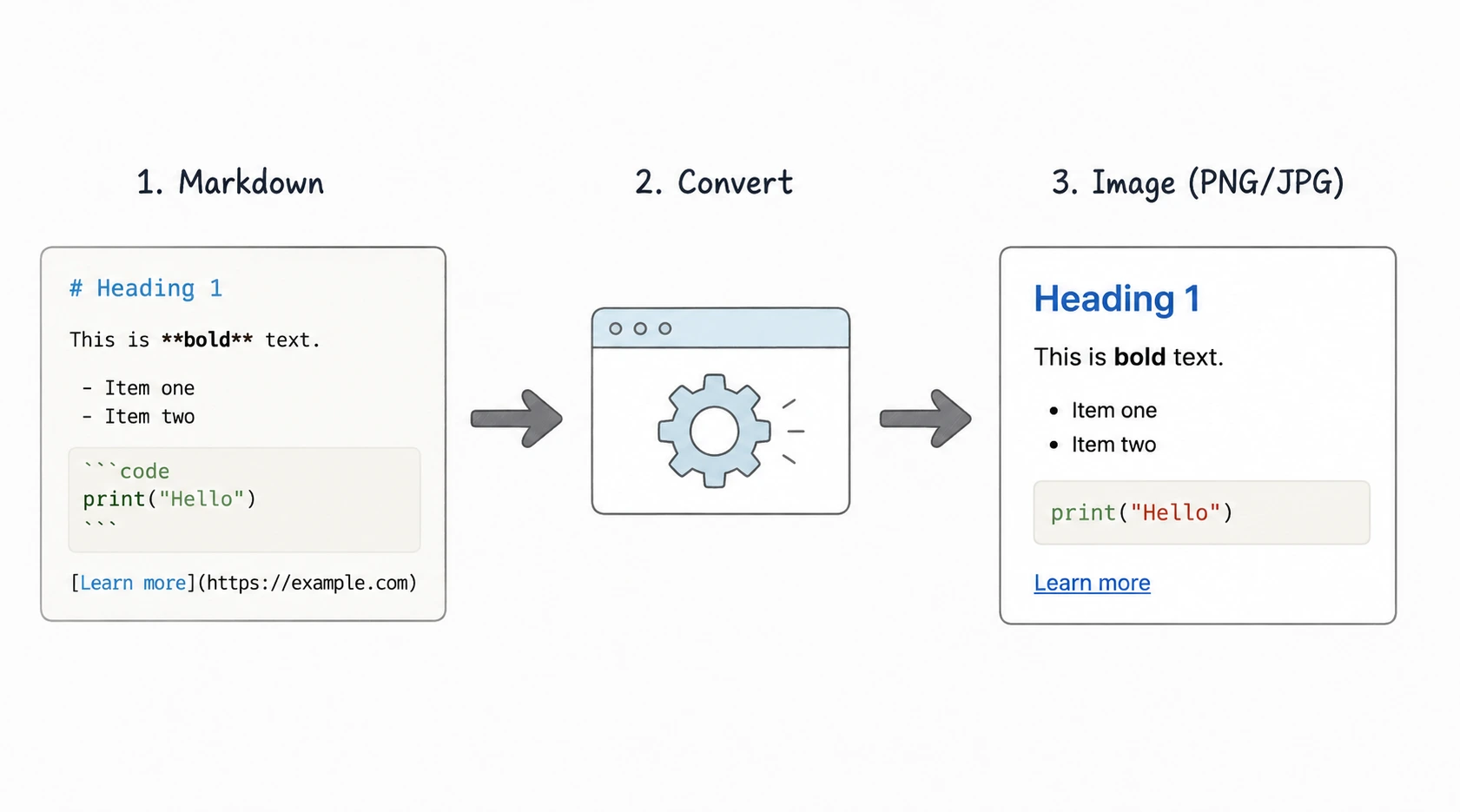
Share formatted Markdown on any platform that supports images.
Loading converter…
Share formatted Markdown on any platform that supports images.
Keep headings, tables, lists, blockquotes, task lists, and code blocks looking exactly as intended.
Turn README sections, project highlights, and code examples into shareable images.
Add documentation, diagrams, and code snippets directly to presentation slides.
Share tutorials, technical tips, changelogs, and announcements as professional images.
Create visuals for knowledge bases, guides, FAQs, and developer documentation.
Convert Markdown generated by ChatGPT, Claude, Gemini, Cursor, or GitHub Copilot into polished images.
Generate clean exports without browser tabs, scrollbars, cropping, or editing.
Your Markdown renders consistently across desktops, mobile devices, and collaboration platforms.
| Format | Best use case |
|---|---|
| PNG | GitHub README snippets, documentation, code blocks, tables, diagrams, tutorials, and text-heavy content. |
| JPG | Social media posts, presentations, blog graphics, and situations where smaller file sizes are preferred. |
PNG produces sharper text and preserves fine details, making it the preferred format for developer documentation, Markdown tables, code snippets, GitHub README content, and technical tutorials. If readability is your priority, PNG is usually the best choice.
JPG creates smaller file sizes while maintaining good visual quality. It's ideal for presentations, social media posts, newsletters, and general-purpose sharing where download size matters more than maximum text sharpness.
Choose the format based on where your image will be used—PNG for clarity and documentation, JPG for lightweight sharing and presentations.
Heading hierarchy is preserved for clear document structure.
Clean spacing and readable text layout are maintained.
Text emphasis is preserved in the exported image.
Ordered and unordered lists render with proper spacing.
Markdown checklists and completed tasks are displayed correctly.
Standard Markdown tables remain organized and readable.
Link text is preserved as part of the image.
Quote formatting is maintained.
Inline code styling remains clearly distinguishable.
Fenced code blocks are rendered cleanly for sharing.
Section dividers appear in the exported image.
Embedded images are included in the preview when supported by the source Markdown renderer.
Export project highlights, installation guides, feature lists, and examples as PNG or JPG images.
Create visuals for API guides, developer documentation, knowledge bases, and user manuals.
Turn Markdown instructions into easy-to-follow images for blogs, courses, and documentation.
Share clean, readable code examples in presentations, articles, discussions, or developer communities.
Publish technical tips, release announcements, changelogs, and educational content as images.
Share project updates, meeting notes, release checklists, and documentation in Slack, Microsoft Teams, or Discord.
Convert Markdown from ChatGPT, Claude, Gemini, Cursor, or GitHub Copilot into presentation-ready visuals.
Save and share organized notes, summaries, and revision material as high-quality images.
Markdown to Image produces sharp, high-quality PNG or JPG exports. Screenshots depend on screen resolution and zoom level.
Exported images include only your Markdown content. Screenshots may capture browser tabs, toolbars, or scrollbars.
Markdown to Image delivers consistent rendering from your preview. Screenshots can vary based on window size or display settings.
Edit the Markdown and export again instantly. Screenshots require taking a new capture every time your content changes.
No cropping or cleanup needed after export. Screenshots often require cropping and manual adjustments.
Markdown to Image suits documentation, tutorials, GitHub README files, presentations, and long-term sharing. Screenshots work best for quick one-off informal captures.
Paste Markdown into the editor or upload an .md or .markdown file from your computer.
Check headings, paragraphs, tables, task lists, links, images, code blocks, and spacing to make sure everything appears exactly as expected.
Select PNG for maximum text clarity and technical documentation, or choose JPG for smaller file sizes that are ideal for presentations and social media.
Export your Markdown as a high-quality PNG or JPG image that's ready to share in GitHub discussions, documentation, presentations, blogs, chat applications, or social media.
Generate sharp PNG and JPG images from Markdown without losing formatting.
Maintain headings, lists, tables, task lists, blockquotes, links, and code blocks.
Review your Markdown before exporting to ensure the layout looks correct.
Create image exports in seconds without manual formatting or screenshots.
Works directly in your browser with no software installation required.
Your Markdown stays on your device—nothing is uploaded or stored.
Choose the format that best fits documentation, presentations, or social media.
Perfect for GitHub, blogs, documentation, presentations, chat apps, and knowledge bases.
Unlimited Markdown image exports with no registration required.
Yes. You can export Markdown as a high-quality PNG image while preserving headings, tables, lists, task lists, code blocks, links, and other formatting. PNG is ideal for documentation, GitHub README snippets, tutorials, and any content where sharp text and readability are important.
Choose JPG when smaller file sizes are more important than maximum image quality. JPG works well for presentations, blog graphics, newsletters, and social media, while PNG is generally the better choice for text-heavy content such as documentation and code snippets.
Yes. Paste content from a GitHub README or upload an .md file to generate clean PNG or JPG images. This is useful for sharing project highlights, installation instructions, release notes, feature lists, and code examples without exposing raw Markdown.
Yes. The converter supports standard Markdown elements including headings, paragraphs, lists, tables, task lists, blockquotes, links, inline code, and fenced code blocks. Review the preview before downloading to ensure everything appears exactly as expected.
Yes. You can upload .md and .markdown files or simply paste Markdown into the editor. The live preview updates automatically, allowing you to review the layout before exporting the final image.
Yes. Everything is processed locally in your browser. Your Markdown is never uploaded, stored, or shared, helping keep documentation, notes, and project content secure.
Last updated: Category: Markdown Converters